


|
|
|
|
|
#1
 01-30-2007, 09:03 PM
|
||||
|
||||
 How do I register?
Registration on the Shop Forum is a 2-step process...registration and account activation.
1) Registration begins by clicking on either of the links near the top of the Shop Forum that say "register": 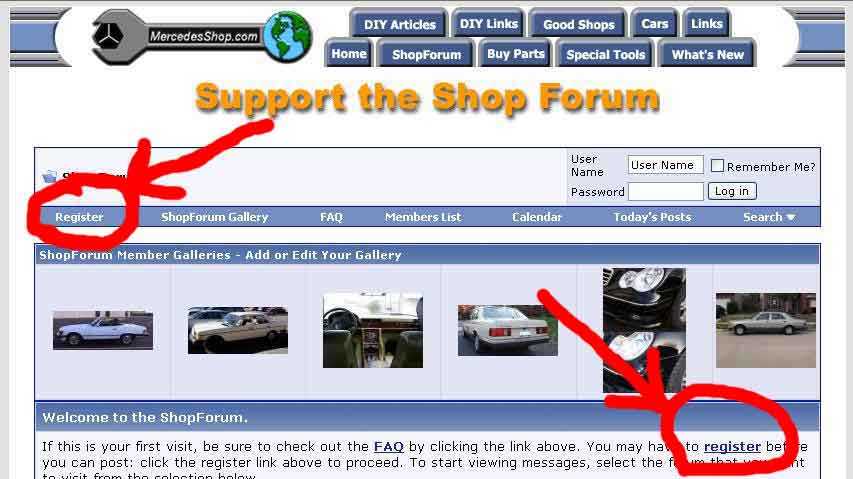 2) Next you should see the ShopForum rules. Carefully read the Forum Rules and check the box that says "I have read, and agree to abide by the ShopForum rules."  Click "Register".  3) Fill out the registration form that appears... - Your User Name must be unique. You cannot use a User Name already in use by another member. If you do, you will get an error. Also note that your User Name is the name that will be displayed on all of your posts in the Shop Forum. You can use your real name or a "handle". It's up to you. - Use any password you want but be aware that passwords are CASE SENSITIVE. - MAKE SURE the email address you enter is valid and entered correctly. If your email is wrong you may never be able to activate your account. (Note-email addresses do not begin with www. They usually look like [email protected]) You cannot have more than one registration using the same email address. The same User Name and Password you select can be used to access the Shop Forum from any computer...not just the one you registered with. - Enter the letter or digits you see to the right into the Image Verification field. - Select your time zone - Check or uncheck the Receive Email options. - Click "Complete Registration" to complete the registration.  4) Within a few moments you will automatically receive an email at the address you entered. This is the Activation Email. If you don't receive the email then either you entered the wrong email address in step #3 above or you have a spam blocker that has intercepted the email.  Be sure to look in your Spam Folder if you have a spam blocker. Be sure to look in your Spam Folder if you have a spam blocker.5) To activate your account, click the link in the Activation Email where it says "To complete your registration, please visit this URL:". If you have AOL then you should click the link that says "America Online Users Please Visit Here to be Activated" If neither of the above links work then CLICK HERE and enter on that page the Username and Activation ID you see near the bottom of the Activation Email. That's it! You are now a registered and activated member of the Shop Forum. You should be able to post new threads and post to existing threads. Here's how to post a question: 6) Select the forum you want to ask your question in. 7) Click on the "New Thread" button. It looks like this:  Have fun! 
__________________
Bill Wood - Retired Webmaster My Personal Website 1998 Mercedes E430 2010 Toyota Sequoia My Photo Albums |
 |
| Bookmarks |
|
|


 Linear Mode


